AI Text Humanizers: Make AI Writing Sound Natural
Remove the robotic tone from your content. Here is how AI text humanizers work and the exact editing steps to make your AI writing sound natural.
 Henry · 6 min read
You just generated the perfect landing page copy, but it reads like a corporate robot wrote it. According to Google Keyword Planner, about 320 people search for AI text humanizers every month to solve this exact problem. When you use AI to draft your launch materials, emails, or blog posts, the output often feels stiff and formulaic.
Readers spot AI-generated text instantly. It uses the same tired transitions, the same predictable sentence structures, and the same inflated vocabulary. If you want your audience to trust your product, your messaging needs to sound like a real founder wrote it.
Here is how AI text humanizers work, the trade-offs of using them, and the exact manual editing steps to make your AI writing sound natural.
Why does AI writing sound robotic?
AI writing sounds robotic because it predicts the most mathematically probable next word, resulting in low predictability and low sentence length variation. Human writers naturally mix short, punchy sentences with longer, complex ones, while AI defaults to a monotonous, highly predictable rhythm that detectors easily flag.
In technical terms, AI detectors measure two things: perplexity and burstiness. Perplexity is how predictable your word choices are. Burstiness is how much your sentence lengths vary. Because large language models are trained to be helpful and safe, they gravitate toward average, highly probable sentence structures.
This creates a distinct, robotic tone. It is why ChatGPT loves phrases like "in today's fast-paced world" or "a testament to."
This robotic baseline creates a specific problem for non-native English speakers. A 2023 Stanford HAI study showed that AI detectors falsely flag human-written essays by non-native English speakers up to 61% of the time (HuggingFace, 2026). Many founders use humanizers simply to alter their sentence rhythms and avoid these false positives.
How do AI text humanizers work?
AI text humanizers work by restructuring sentences and swapping vocabulary to disrupt the predictable statistical patterns that AI detectors look for. They intentionally increase sentence variation and use less common phrasing to mimic human writing, effectively lowering the text's overall AI probability score.
When you paste a draft into a humanizer, the tool rewrites the text to introduce artificial burstiness. A large-scale study of 19,804 AI-generated texts found that humanization reduced the likelihood of AI detection in over 90% of cases (ReText.ai, 2026).
However, there is a severe trade-off between evading detection and writing quality.
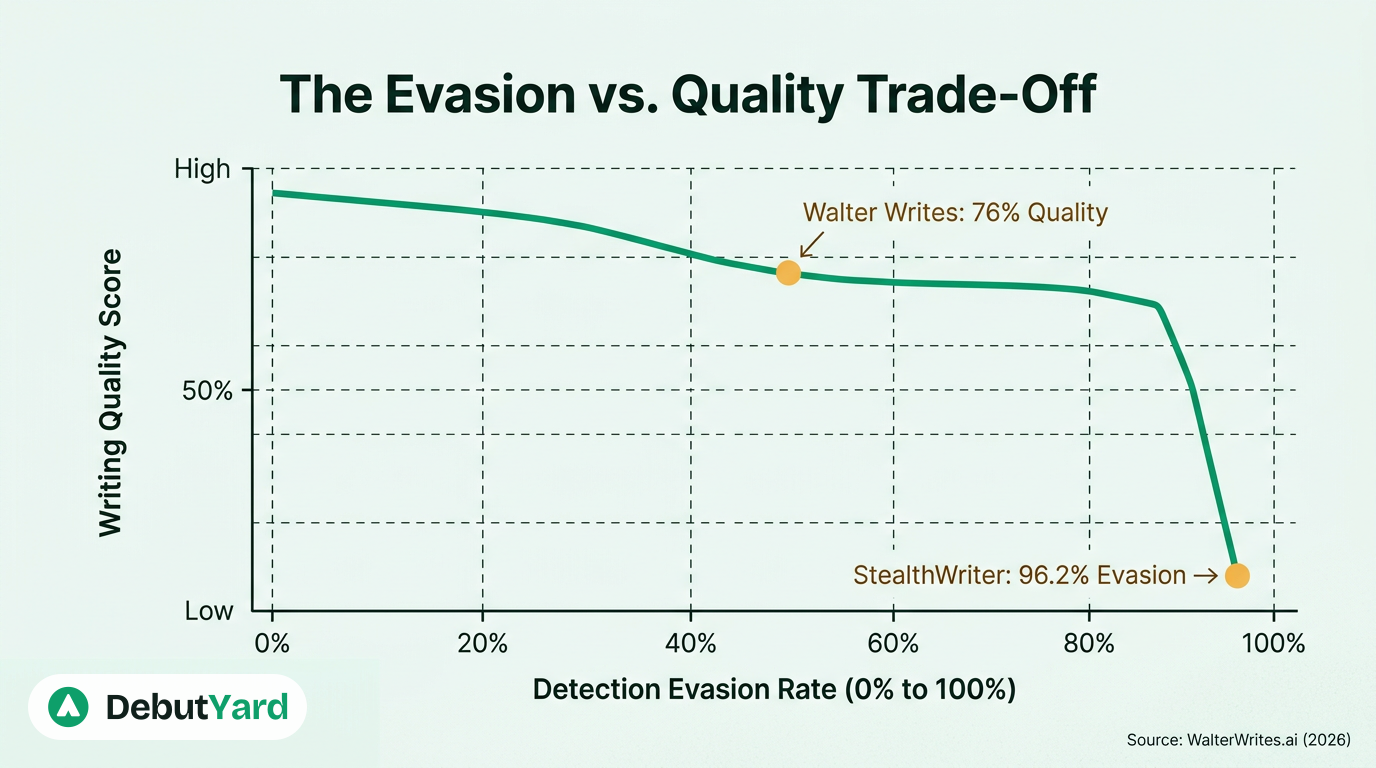
Independent testing of 10 humanizers showed that tools achieving extremely high bypass rates (like StealthWriter at 96.2%) did so at the direct cost of "weak and sometimes broken writing quality" (WalterWrites.ai, 2026). If a tool scrambles your text too aggressively to beat a detector, it becomes unreadable to your actual customers.
Using an AI tone remover to rewrite AI text
If you want to strip the robotic tone from your copy without breaking the grammar, you need a tool focused on style rather than pure detector evasion. Lattice is a free AI tone remover built specifically to rewrite stiff or AI-sounding text so it reads naturally.
Instead of using a standard language model prompt to rewrite the text, Lattice uses multi-hop translation. It passes your text through a series of different languages—for example, English to Spanish to German to Japanese, and back to English.
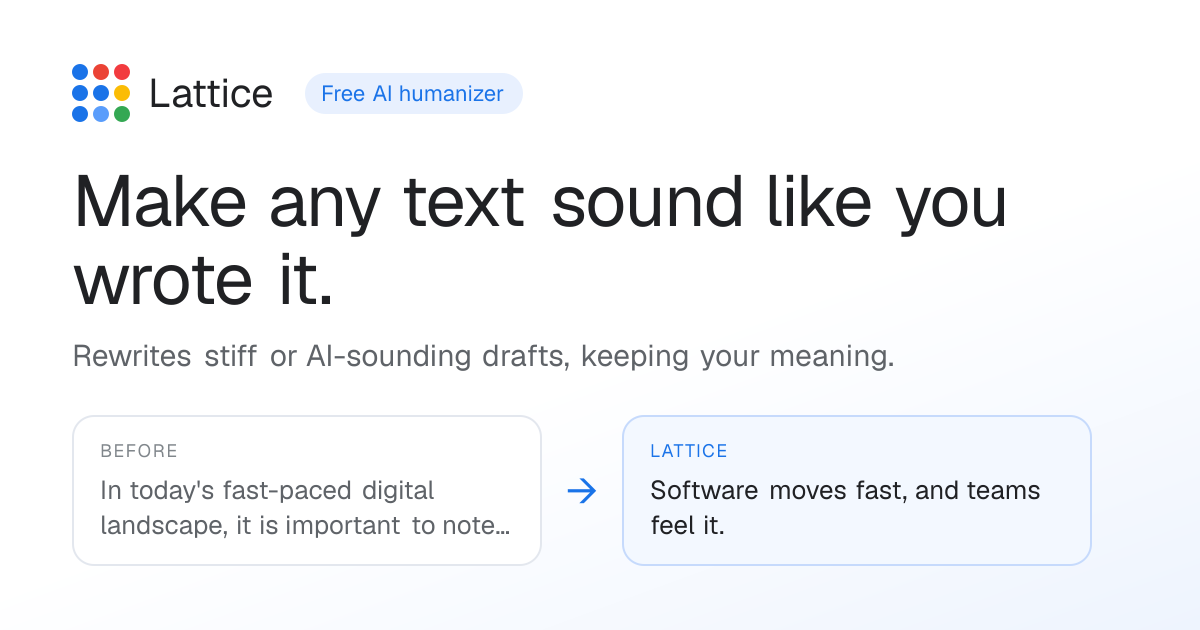
Because every language phrases ideas differently, this journey strips away the predictable filler and stock openers. The meaning carries through, but the formulaic AI rhythm drops out.
Preserves specifics: Lattice is engineered to keep names, numbers, technical terms, and citations intact.
Free to use: You get a set of free rewrites every day (up to 1,000 characters each) when you sign in with Google.
16 languages: You can edit the translation path yourself using languages like French, Dutch, Korean, and Arabic.
Every tool has limitations. Lattice notes on its privacy page that it must send your text to external translation APIs to process the hops. Additionally, Lattice states plainly that it is built to make writing read naturally, not to guarantee a passing score on an AI detector.
How to make AI text sound human manually
To make AI text sound human manually, you must vary your sentence lengths, delete inflated transition words, and anchor your claims with specific, checkable facts. Experts agree that one pass of light manual editing always beats running your copy through multiple automated humanizer tools.
If you prefer to rewrite AI text yourself, follow this four-step editing framework.
1. Fix your sentence rhythm
AI text has a relentless, medium-length rhythm. Every sentence is 15 to 20 words long. To fix this, you need to manually inject burstiness.
Write a very short sentence. Two or three words. Then, follow it with a longer, more explanatory sentence that provides the context your reader needs. Break up large blocks of text into single-sentence paragraphs. Read your copy out loud; if you run out of breath, the sentence is too long.
2. Delete transition cliches
AI models lean on transition words to connect ideas, even when they aren't needed. Use the search function in your document to find and delete these common AI tells:
Furthermore
Moreover
Crucial
Vital
Navigating the landscape
A testament to
Just delete them. The sentence almost always reads better without them.
3. Anchor claims with hard facts
AI speaks in generalities. It will say your software "significantly improves productivity." A human founder says, "Our software saves the average team 4 hours a week."
Replace adjectives with data. If you don't have data, use a specific, concrete example from your own experience. An AI cannot replicate personal anecdotes.
4. Avoid automated grammar checkers
Once you make AI text sound human, do not run it through an automated proofreader for a final polish.
Preparing your natural copy for launch
Whether you use a tool like Lattice or edit by hand, natural copy is essential for growth. When you submit your product to DebutYard or submit to other launch directories, your tagline and description are your first impression. If they read like a ChatGPT prompt, early adopters will skip over you.
Founders using our directory submission service often ask why their submissions get rejected by moderators on other platforms. The most common reason is robotic, AI-generated marketing copy that feels like spam.
Take the extra ten minutes to strip the AI tone from your launch materials. Speak plainly, use real numbers, and write exactly how you would explain your product to a friend.
Keep reading
Weekly recap
Week 47, 2026 recap: UnoRouter takes Debut of the Week
15 products debuted on DebutYard in Week 47, 2026 (Nov 16 – Nov 22, 2026), and the community gave 6 claps. 🥇 UnoRouter: One OpenAI compatible key for every major AI model (2 appl…
Henry23 Nov 2026 · 5 min
Tools
8 Best Linktree Alternatives for Better Conversions
Outgrowing Linktree? Explore the top link-in-bio alternatives for selling digital products, building media kits, and fully customizing your landing page.
Get new posts by email
One email each Monday: the week's winners, new debuts and whatever we published.